
FlutterFlow Features: What You Actually Get in 2026
Paresh Mayani
Sep 17, 2026
Share Article


I get asked about FlutterFlow on almost every scoping call now, usually by a founder who found it on YouTube, built a demo screen over a weekend, and wants to know if it can actually carry a real product past that first demo.
So here's the honest rundown. What does FlutterFlow actually give you? Let's go feature by feature, based on the current platform and our own project work.
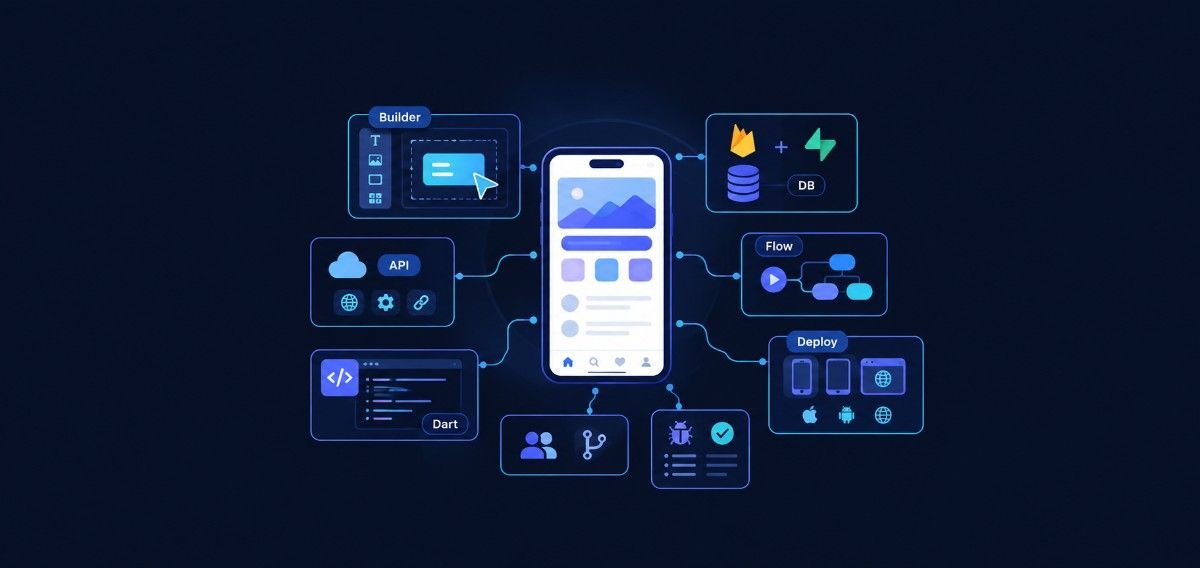
Short answer first: FlutterFlow is a visual builder built on top of Flutter. You design screens and set up logic through drag and drop. Underneath, it writes real Dart code. And you can export that code any time you want.
That one fact shapes almost everything else on this list. It's what sets FlutterFlow apart from tools like Bubble or Adalo. With those, your app never leaves their servers. With FlutterFlow, it can.
What FlutterFlow actually is
FlutterFlow is a browser-based builder for apps, built on top of Google's own Flutter framework, and Google's Flutter team actually bought the company back in 2025, which tells you something about where this tool is headed.
You build screens by dragging widgets. You connect a backend. You set what happens when someone taps a button. FlutterFlow turns all of that into a real Flutter app. It works on iOS, Android, web, and desktop.
Over 3.3 million people have accounts on the platform. Not all of them are active builders, but the number still says a lot about how far this tool has spread.
If you want to see how this compares to hand-coded Flutter or React Native, we've covered that in our Flutter vs. React Native comparison. For now, let's look at what you actually get.
The visual builder and design system
This is the part everyone sees in demo videos. You drag widgets onto a canvas. FlutterFlow gives you more than 200 configurable UI elements. You also get over 1,000 prebuilt templates, so you rarely start from a blank screen.
Responsive design comes built in. A layout you build for mobile will usually adapt well to tablet and web too.
Here's the part that matters more than the drag and drop, though. It's the design system underneath. You set up a theme once: colors, fonts, spacing. Then you reuse it across every page. You can even import a Figma theme directly if your designer already built one.
Once you like a component, save it to a shared library. Pull it into other projects later. This saves real time if you build more than one app for the same client, or across the same team.
Backend and data connections
FlutterFlow doesn't try to be its own database. It connects to what you already use, or want to use. Firebase is the default, and it's the most mature option. Set up Firestore collections visually. Define your field types. FlutterFlow writes the read and write logic behind each screen. You don't type a single query by hand.
Supabase support came later. It's become the go-to choice for teams who want a Postgres backend instead of Firebase's NoSQL setup.
Beyond those two, you get REST API support. You can import a Swagger or OpenAPI file too. So if your team already has an API, you wire FlutterFlow straight into it. No need to build a second data layer.
Authentication is built in as well. Email and password, Google sign-in, and a few other providers. No custom code needed. For most MVPs, that covers it. FlutterFlow's own documentation walks through each provider setup step by step if you want the exact configuration.
The Action Flow Editor
Every no-code tool runs into the same wall eventually. How do you handle logic that isn't just "show this screen"? FlutterFlow's answer is the Action Flow Editor.
It's a visual system for chaining steps together. Check a condition. Loop through a list. Call an API. Write to a database. Navigate to a new screen. You build all of this visually, and it covers most of what a typical app needs.
For the harder parts, you're not stuck. You can write custom Dart functions. You can build custom widgets. You can drop custom code right inside the visual editor. This is where FlutterFlow stands apart from stricter no-code tools. It doesn't force a choice between visual building and real code. Use whichever one fits the problem in front of you.
State is handled through app state and page state variables. Think of it as FlutterFlow's version of Provider or Riverpod, the tools you'd normally reach for in hand-coded Flutter. It's not as flexible. But for most CRUD-style apps, it works fine without friction.
Code ownership and export
This is the feature that matters most if you're building something you plan to keep. At any point, download the full Flutter source code. Open it in VS Code or Android Studio. There's no hidden runtime. No lock-in at the code level.
If you outgrow the visual builder later, or need a developer to take over, the code is real Dart. It's not some format only FlutterFlow can read.
We've seen this exported code hold up well in practice. Naming stays consistent. The project structure is close to what a developer would build by hand. A new developer can usually pick it up fast.
One honest note, though: exported code from a visual tool often carries more extra structure than code written by hand from day one. Budget some cleanup time if you plan to run this app for years.
Collaboration and version control
The higher plans unlock real-time collaboration. Two people can edit the same project at once, like editing a Google Doc together. You also get project branching. A team can build a new feature without touching the main build. Then merge it back once it's tested.
GitHub integration pushes your generated code straight to a repository. That matters if your dev team wants to review changes the normal way, instead of trusting a black box.
Project commenting adds feedback right on the design itself. A stakeholder can leave a note on one screen without opening a separate tool.
Anyone invited to a project can view, test, and edit it from a browser. Nobody needs Flutter installed just to check progress. This alone speeds up client reviews more than you'd expect.
Testing and debugging
FlutterFlow includes a Debug Panel. It surfaces errors and logic issues without you digging through generated code to find them.
You can run the app on a real device with Local Run. Or download the code and debug it directly in your own IDE, the same tools we walk through in our guide to the best Flutter development tools.
Automated testing shows up on the higher-tier plans. Set up repeatable test flows, so a change on one screen doesn't quietly break another. It won't replace a full QA process on anything complex. But it catches obvious problems before a client demo.
Deployment across platforms
Once your app is ready, deployment takes one click. Push straight to the App Store and Google Play. Publish to the web on your own custom domain.
Built-in localization uses Google Translate. It's a fast way to get a rough multi-language version out the door. We'd still recommend a human review pass before anything reaches real customers, though.
Since the code underneath is standard Flutter, you're not locked into FlutterFlow's own pipeline either. Export the code and run it through your own setup with Codemagic or GitHub Actions if that fits your team better.
The integration ecosystem
FlutterFlow ships with ready-made connections for the services most apps need anyway. Stripe and RevenueCat handle payments and subscriptions. Algolia powers search. OneSignal covers push notifications. Google Maps adds location features.
These aren't deep custom builds. But they save you from wiring up an SDK from scratch for things almost every app needs.
AI agents are part of the platform too. They connect to OpenAI, Google, and Anthropic models right inside your app's logic. We've covered how FlutterFlow's AI side works in a separate, deeper post on FlutterFlow's AI features, since it's grown into its own feature set that deserves more than a quick summary here.
What it costs
The Free plan gives you the full visual builder, plus Firebase or Supabase connections. But there's no code export and no deployment from inside the tool. It's fine for testing an idea. Not for shipping one.
The Basic plan, currently $39 a month, adds code and APK downloads, plus one-click app store deployment. This is where most people start when they're building something real.
Team plans start around $80 a month for the first seat. That gets you real-time collaboration, GitHub integration, and multiple branches. Prices climb from there depending on team size and testing needs.
Pricing on any SaaS tool shifts often. We'd point you to FlutterFlow's own pricing page rather than quote numbers here that go stale in six months. The full feature list, straight from the source, lives on FlutterFlow's product page if you want to see it laid out yourself.
Where this fits against hiring a developer
FlutterFlow is genuinely good at a few things. Validating an idea fast. Building an internal tool. Getting a founder-led MVP in front of early users without hiring a team first.
Here's where it tends to hit a wall, and it's worth saying plainly: complex custom logic, heavy real-time requirements, or anything needing deep platform-specific behavior tends to push past what the visual layer was ever built to express cleanly.
Most teams we talk to use FlutterFlow to prove the idea first. Then they bring in developers once the product needs to scale past what a small team can maintain inside the builder. If that's where you are, we've broken down what it actually costs to hire Flutter developers and how to go about hiring the right ones in separate guides. And if you'd rather hand the whole build to a team that does this daily, that's the kind of cross-platform app development work we take on.

Common questions
1. Is FlutterFlow good enough for a production app?
Yes, for a wide range of apps. The code it generates is real, exportable Flutter. Companies well past the startup stage use it for internal tools today. The honest caveat: anything with heavy custom logic will need a developer involved at some point, whether that's on day one or once you hit the builder's ceiling.
2. Do I need to know how to code to use FlutterFlow?
No, not for the basics. You can build a working app with login, a database, and standard navigation, all through the visual interface. Custom code becomes useful once you need something the visual tools don't cover. It's optional, not required.
3. Can I move my FlutterFlow project to a regular Flutter codebase later?
Yes. Code export is one of FlutterFlow's core features, not an afterthought. Download the generated Dart code any time. Hand it to a development team to continue in a normal IDE, fully outside FlutterFlow.
4. How is FlutterFlow different from Bubble or Adalo?
The biggest difference is code ownership. Bubble and Adalo keep your app running on their own servers, with no real code export. FlutterFlow generates actual Flutter source code you can take with you. That matters a lot once you plan to scale past a prototype.
Where this leaves you
FlutterFlow earns its popularity honestly, because the combination it offers, a real visual builder, actual code ownership, and solid backend integrations, is genuinely hard to find together anywhere else in the no-code space.
Whether it's right for your app depends more on what you're building than on the tool itself. That's a conversation worth having before you commit weeks to either path.


